DON’T BUY THIS ENCLOSURE
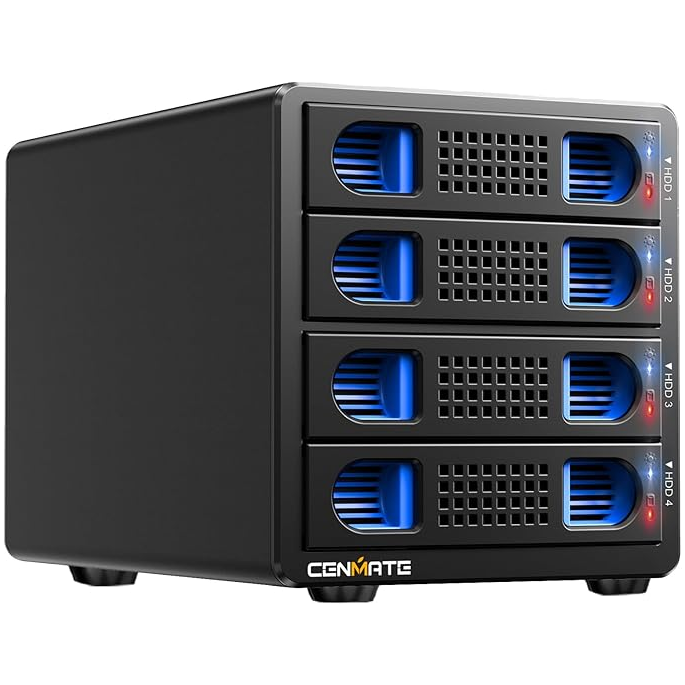
When a “Quick and Easy” NAS Turns Into a Disk Killer. This post was originally meant to describe a quick and easy way to build a NAS using a Raspberry Pi. After some real-world testing, however, it turned into something else entirely: a cautionary tale about USB enclosures and how they can quietly destroy your hard drives.
The original idea was straightforward. Buy a USB enclosure, plug it into a Raspberry Pi (or any Linux box), and – voilà – you have a RAID system. For a while, everything appeared to work perfectly. I installed two high-quality RAID drives (Seagate IronWolf, Device Model: ST8000VN004-3CP101, 8 TB), and the array behaved exactly as expected.
Even with RAID, though, cold backups are still essential. So I did what most people would do: I added a third hard disk to one of the enclosure’s empty bays and started copying data from the RAID to that disk.
That’s when the problems began.
Data transfers started producing I/O errors, yet SMART (Self-Monitoring, Analysis and Reporting Technology) showed no issues at all. These were brand-new drives, after all. To rule out a faulty disk, I removed the backup drive from the enclosure and placed it into a different external case. Copying the same data now worked fine, at least initially.
This strongly suggested a power problem. The enclosure simply doesn’t provide enough power to reliably run three or more disks under sustained load.
Things got worse.
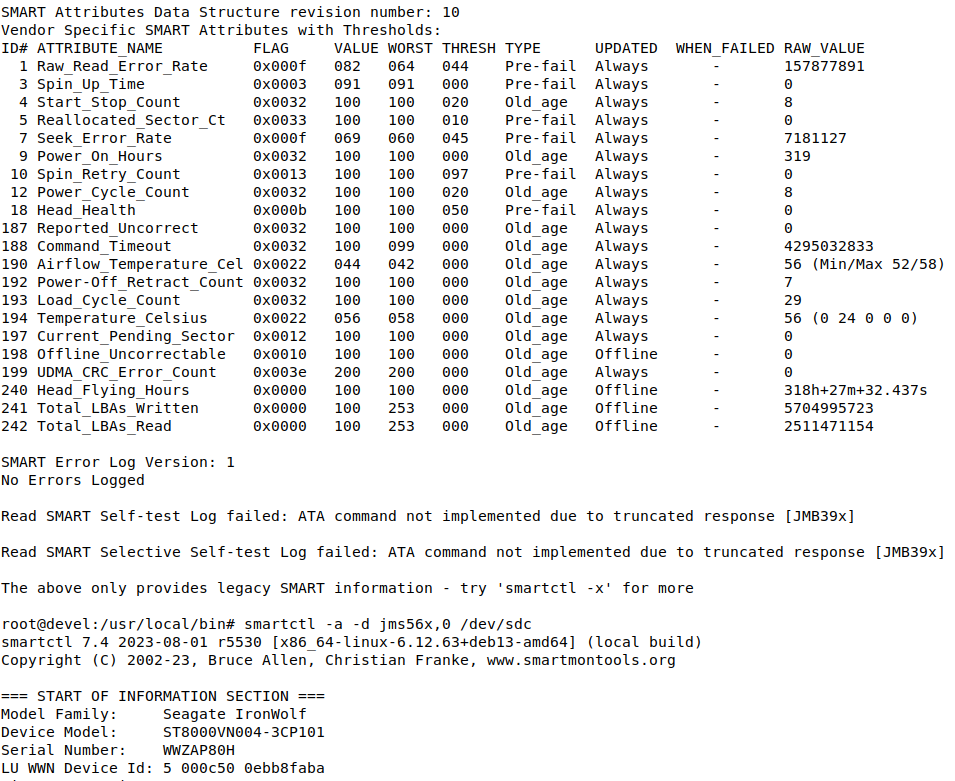
Partway through the backup, transfer speeds collapsed from normal levels to about 1 MB/s – or even less. A quick temperature check told the rest of the story. The target disk (now outside the enclosure) was sitting at 44 °C. The source disks still inside the enclosure were at 55 °C, with recorded peaks of 58 °C.
Those temperatures are dangerously high for hard disks and will dramatically shorten their lifespan. For a product sold as a multi-bay hard disk enclosure, this is completely unacceptable.
What started as a “quick and easy NAS” experiment ended as a clear warning: cheap or poorly designed USB enclosures can quietly damage your drives through inadequate power delivery and insufficient cooling – even when everything looks fine. But the SMART tells the truth:
So – do not buy this. It is under-powered, it doesn’t provide enough cooling and is unsafe for your hard disks.
This is the original article I wrote:
I had an old NAS lying around, but it no longer supported safe Microsoft network protocols.
My old LG NAS had served me reasonably well, but recent Linux distributions finally drew a hard line: SMBv1 is blacklisted. For good reason, it’s a security nightmare. I could have re-enabled it, but honestly… why bother? A Raspberry Pi 5 was sitting on my desk, and I thought: Sure – why not.
Now, let’s be realistic. A Raspberry Pi, even a Pi 5, is not exactly a data-shuffling powerhouse. So the heavy lifting, specifically RAID mirroring, needed to happen elsewhere. Fortunately, there are hard drive enclosures that do exactly what I wanted: you plug in a couple of disks, and the enclosure presents itself as a single device over USB 3. Simple and transparent.
The enclosure I bought has four bays: the top two drives are configured as a RAID-1 array, while the third and fourth disks operate independently, with the third drive designated as the Raspberry Pi OS boot drive.
I ordered one from Amazon, and it arrived two days later. Out of curiosity, I first connected it to my PC. It mostly worked – but not without issues:
usb 2-7.2: USB disconnect, device number 3
2026-01-10T14:49:32.997890-07:00 elara kernel: sd 7:0:0:0: [sdl] tag#0 FAILED Result: hostbyte=DID_NO_CONNECT driverbyte=DRIVER_OK cmd_age=0s
2026-01-10T14:49:32.997891-07:00 elara kernel: sd 7:0:0:0: [sdl] tag#0 CDB: Write(10) 2a 00 02 80 cd 00 00 04 00 00
2026-01-10T14:49:32.997891-07:00 elara kernel: I/O error, dev sdl, sector 41995520 op 0x1:(WRITE) flags 0x0 phys_seg 128 prio class 2
2026-01-10T14:49:32.997892-07:00 elara kernel: sd 7:0:0:0: [sdl] tag#2 FAILED Result: hostbyte=DID_NO_CONNECT driverbyte=DRIVER_OK cmd_age=0s
More on that later. My PC has had USB problems for a while. It occasionally even loses the keyboard. Maybe one day I’ll have the time and money for a new main board. For now, the plan was to attach the enclosure to the Raspberry Pi anyway.
First obstacle: I had forgotten the Raspberry Pi’s password. That required some SD-card surgery to reset it, but once that was sorted out, I connected the RAID enclosure. The Pi recognized the disks immediately.
I didn’t feel like setting up SMB or NFS, so I went with a quick-and-dirty solution: SSHFS. It worked perfectly.
Next step: booting the Raspberry Pi directly from the RAID.
I grabbed rpi-clone from GitHub, and within minutes the Pi was booting from the array, well – almost. The boot process stalled with complaints about a missing UID. It turned out that rpi-clone hadn’t updated the kernel command line correctly.
The issue was the PARTUUID. These identifiers, used in both fstab and cmdline.txt, depend on whether the disk uses a GUID or MBR partition table, which in turn depends on disk size. In my case, the fix was simple: ask fdisk for the correct PARTUUID, update cmdline.txt, reboot and the Pi came up cleanly.
However, USB trouble wasn’t done with me yet. The Pi started throwing errors like these:
kernel: sd 0:0:0:0: [sda] tag#10 uas_eh_abort_handler 0 uas-tag 10 inflight: CMD OUT
2026-01-10T22:56:06.383395+00:00 raspberrypi kernel: sd 0:0:0:0: [sda] tag#10 CDB: opcode=0x2a 2a 00 10 00 b1 00 00 04 00 00
2026-01-10T22:56:06.383405+00:00 raspberrypi kernel: sd 0:0:0:0: [sda] tag#9 uas_eh_abort_handler 0 uas-tag 11 inflight: CMD OUT
2026-01-10T22:56:06.383411+00:00 raspberrypi kernel: sd 0:0:0:0: [sda] tag#9 CDB: opcode=0x2a 2a 00 10 00 b5 00 00 04 00 00
That’s… not great.
Luckily, this is a well-known problem. USB Attached SCSI (UAS) is fast, but notoriously fragile with certain USB-to-SATA bridges. The solution many people recommend is simply disabling UAS.
First, find the USB vendor and product IDs:
lsusb -t
Then add the following to cmdline.txt:
usb-storage.quirks=XXXX:YYYY:u
Reboot and UAS is disabled.
Yes, this costs a bit of performance. But the errors stopped completely, which is a trade-off I’m happy to make for a NAS.
At this point, my Raspberry Pi RAID NAS has been humming along nicely. The enclosure is (hopefully) dumb enough not to phone home to Shenzhen, and everything else runs cleanly on the Pi.
Quick, dirty, effective.
If you want to monitor your RAID, install smartmontools and use the jms56x driver:
smartctl -a -d jms56x,0 /dev/sda
.. where 0 is the first disk in the array and 1 would be the second. This gives you the basic S.M.A.R.T information to work with:
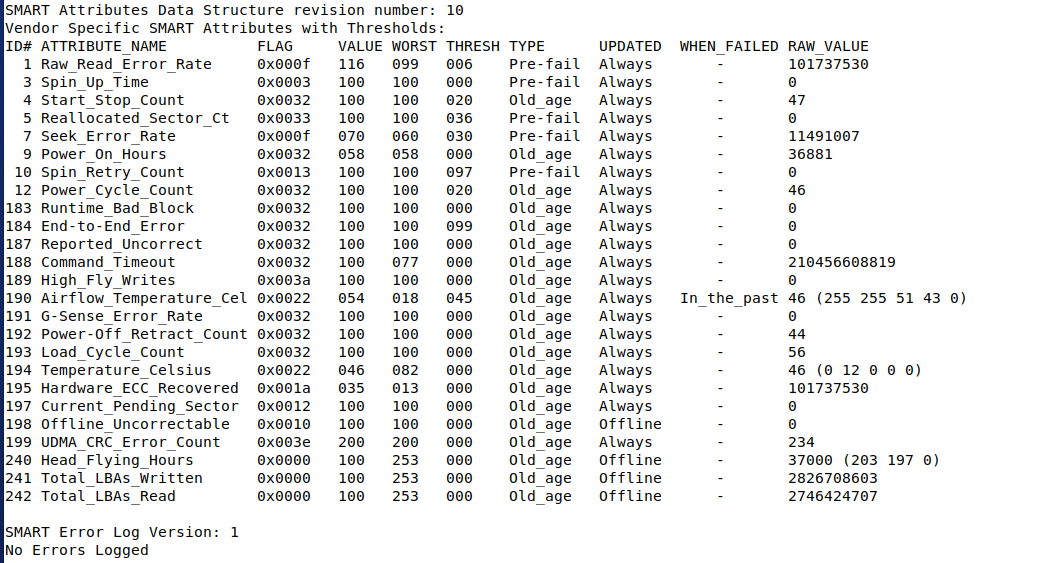
While this is only the legacy info, if gives you pretty much what you need: the Reallocated_Sector_Ct and the Current_Pending_Sector counts. Changes to the values (anything greater than 0) indicates trouble ahead.
As one can see, my HD is ancient. It has a lot of data written, even had overheat issues, but it is still going without any errors. But it might be time to look for new drives.
Michaela Merz is an entrepreneur and first generation hacker. Her career started even before the Internet was available. She invented and developed a number of technologies now considered to be standard in modern web-environments. She is a software engineer, a Wilderness Rescue volunteer, an Advanced Emergency Medical Technician, a FAA Part 61 (PPL , IFR) , Part 107 certified UAS pilot and a licensed ham . More about Michaela ..